
Switching drivers
Several people can drive on one rig. Every lap belongs to whoever was selected when the car crossed the line.
- "Who's driving?" pops up on the dash at the start of each session (with two or more drivers lined up). Confirm with a tap, or it closes by itself at the first line crossing.
- Wheel buttons (F1 25): map UDP Action 2 in the game's controls to switch to the next driver, and UDP Action 1 to throw away the current lap.
- Phone: the phone dash has driver buttons. With SimHub, you can also map the Lap Tracker's actions to any button in SimHub's controls.
- Forgot to switch? The rig's owner clicks Change driver next to the lap in My laps (or Wrong driver? under the rig's name on the lap's page), then picks who really drove it (anyone who joined the rig, or one of its guests). The boards of both drivers are updated, and the driver who loses the lap gets a notification. In the Windows app, Change driver on the Laps tab does the same for the laps on that PC.
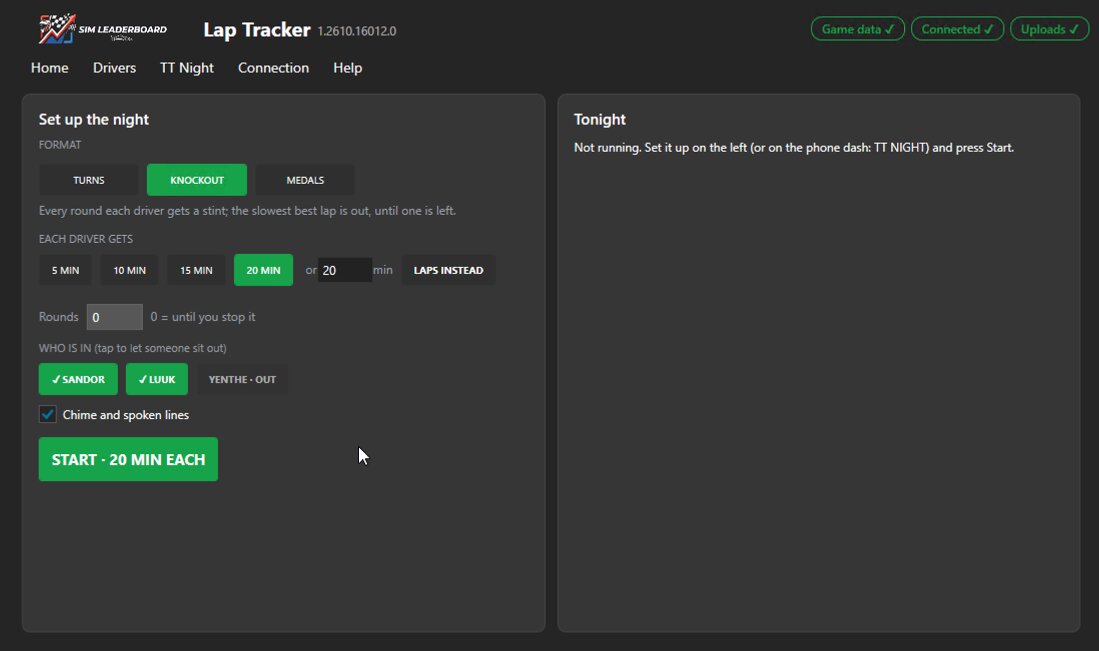
- Stint timer: everyone takes turns with the same time behind the wheel, in minutes (5, 10, 15, 20 or any number you like) or in laps. On the phone dash, tap TT NIGHT with the driver buttons: tap the names of anyone who isn't there tonight (they're skipped), pick minutes or laps, the length and the number of rounds, and press Start. You can also start it on the Lap Tracker page. The countdown shows right after the driver's name and only runs while the car moves. A minute before the end you hear a warning; at zero a chime: finish the lap you're on, it still counts. After the line the dash says whose turn it is; pause or restart, swap seats, and the next driver is selected by itself once the car stands still. Next driver on the wheel or dash hands over straight away. Lost time to a crash or a slow restart? While the night runs, +1 on the TT Night screen (dash, app or iPhone) gives the driver in the seat one more minute (or lap), also after the time is up; −1 takes one off. Only that stint: the next driver gets the normal length.
- TT Nights on the site: a night with the timer shows up under TT Nights (in the menu under your name), live while you drive: who's driving and the time left, standings over the whole evening (per track the fastest valid lap scores 25, 18, 15…), and per track everyone's best lap, best sectors, ideal lap, average, valid laps and warnings. The rig's owner can share a night with a group, so friends at home can follow. Each night hands out titles (winner, closest fight, steadiest, most improved, cleanest, most laps, track limits tester), and Copy recap gives a summary to paste into your group chat. Free keeps your latest five nights; with Pro every night stays, plus your head-to-head record against everyone you raced.
- Formats: on the TT Night screen pick Turns (points per track), Knockout (after every round the slowest best lap is out, until one driver is left) or Medals (per track gold, silver or bronze against the board's record: within 1 %, 2.5 % or 5 %). In Time Trial with two or more drivers lined up, the "Who's driving?" screen has a TT NIGHT? button that takes you straight there.
More in the guide: Getting started · Which laps count · iRacing · The phone dash · The on-screen overlay · Leaderboards · Weekly challenges · Driver rankings · Driver rating · Achievements · The lap page · Setups of the fastest laps · My laps: every lap you drove · My progress: how you develop · Graphs and mini-sectors · Replay: 2D and 3D · The corner table · Telemetry Studio · Track maps · Your account and notifications · Profile, friends and groups · Rigs and friends · Fair play · Privacy and your data · Troubleshooting