
The corner table
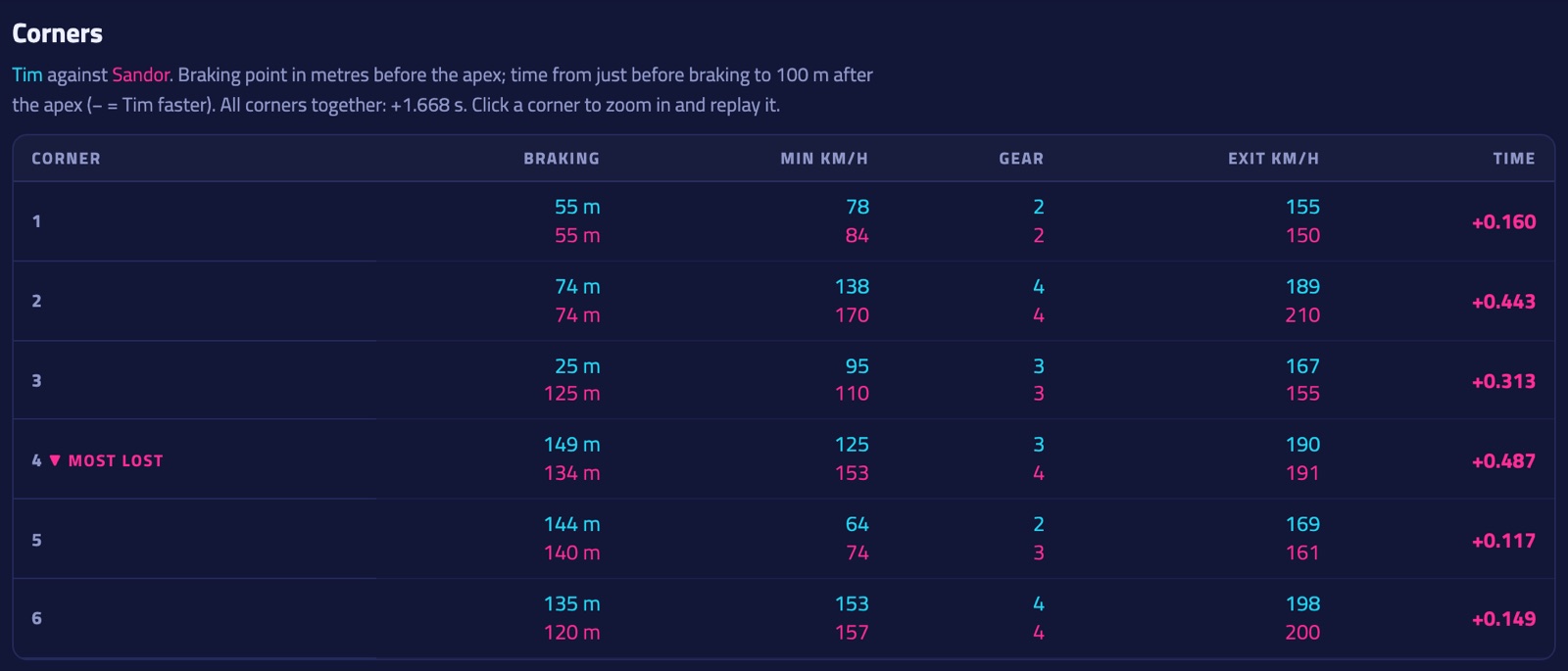
Under the graphs: every corner with both laps next to each other (top line: this lap, bottom line: the lap you compare with, or else the fastest lap on the board).
- Braking: where braking started, in metres before the slowest point of the corner. "lift" means only off the throttle, "flat" means neither.
- Min km/h and Gear at the slowest point, Exit km/h 100 m after it.
- Time: won (−) or lost (+) from just before braking to 100 m after the corner. The biggest gain and loss are marked.
- Turn numbers and names: on the F1 circuits (in every game) the official ones, also on F1 25's reverse layouts (numbered in the order you drive them). Donington Park, Oulton Park, Mugello, Okayama and Tsukuba get the turns from the circuit's map. Other tracks number the corners we find ourselves (C1, C2…).
- Click a corner: the graphs zoom in on it and the replay jumps to just before the braking point. Press play.
- On the map every corner has a numbered bubble with the same time won or lost, in the colour of the faster lap. Click a bubble to jump to that corner; the Corners button above the map hides them.
- Corners are found where the speed bottoms out, so a quick chicane counts as one corner.
- Peak brake: the highest brake pressure in that corner. Well below 100 % usually means you could brake later and harder.
- Balance: how far the car turned into the corner (+, the rear sliding) or pointed out of it (−, the front sliding), for both laps. Under 1° the car was calm.
- Coach tips above the table pick the three corners where you lose the most against the other lap, list what's different (braking point and pressure, coasting, brake and throttle overlap, throttle lifts, steering corrections, less speed at the apex…) and what to try first.
- ✨ AI coach (Pro, 20 a month): an AI reads the same figures plus how you brake, trail brake, coast, steer, use the throttle and shift, and your racing line (turn-in, apex and exit, use of the track width, the straight that follows), and explains per topic what to work on, using common race-driving technique: how long you keep the brakes near their peak, whether you let off and press again, whether you still add steering at the slowest point, how hard you commit to the power onto long straights, and how you handle left-right combinations. Where it fits, it suggests a drill to try on your next laps. It only uses our figures; check its advice in the replay. Pin to the lap under a tip keeps it as a remark at its corner, so it's still there after the coaching is gone.
More in the guide: Getting started · Which laps count · iRacing · Switching drivers · The phone dash · The on-screen overlay · Leaderboards · Weekly challenges · Driver rankings · Driver rating · Achievements · The lap page · Setups of the fastest laps · My laps: every lap you drove · My progress: how you develop · Graphs and mini-sectors · Replay: 2D and 3D · Telemetry Studio · Track maps · Your account and notifications · Profile, friends and groups · Rigs and friends · Fair play · Privacy and your data · Troubleshooting